
Screenshots

App details
- Updated
- Sep 15, 2006
- Language
- English
- Category
- Mobile
SoftPas in:
This product is also available in the following languages:
About File Deleter
Download File Deleter – File Management, System Cleanup, Delete Locked Files
Overview
File Deleter is a specialized utility designed to address a common yet persistent issue on Windows systems: the inability to delete files that are locked, in use, or protected by system permissions. This mobile application serves as a powerful tool for users who frequently encounter obstacles when trying to remove unwanted or corrupted files from their devices. Whether it's leftover installation remnants, temporary system files, or stubborn program data, File Deleter provides a streamlined solution to bypass these restrictions.
The app targets a broad audience, including both casual users and advanced computer operators who value system cleanliness and performance. Its primary function is to eliminate the frustration associated with file deletion errors, offering a direct and efficient path to file removal. By simplifying the process, it helps users reclaim disk space and maintain optimal system operation.
Although the developer did not provide additional background information, the app’s long-standing presence since its release on September 15, 2006, suggests a stable and tested utility. It has likely evolved over time to remain compatible with various Windows environments. Real-world use cases include cleaning up after software uninstallation, removing system cache files, and managing storage on older or heavily used devices.
Within the broader app ecosystem, File Deleter fills a niche role as a lightweight, focused tool that complements more comprehensive system optimization suites. Its continued relevance underscores the ongoing need for reliable file deletion solutions in the Windows environment.
Key Features & Functionality
File Deleter offers a suite of targeted functionalities that directly address file deletion challenges on Windows systems. Each feature is designed to enhance user control and reduce friction during the cleanup process.
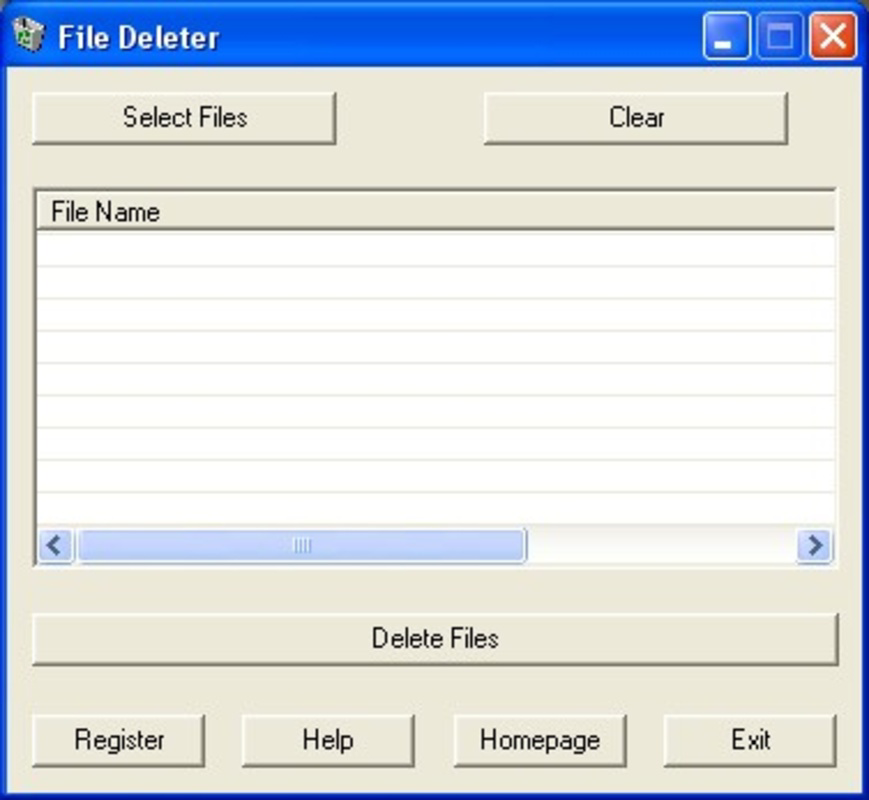
- Easy File Selection: The app allows users to select files through a straightforward interface. Files can be added individually or in bulk, enabling efficient management of multiple items without complex navigation.
- Bypasses File Protections: One of the app’s core strengths is its ability to override standard Windows file access restrictions. This enables deletion of files that are currently in use by running processes or protected by system policies.
- User-Friendly Interface: The layout features clearly labeled buttons and a minimalistic design, ensuring that even users with limited technical experience can operate the app confidently.
- Quick Deletion Process: Once files are selected, deletion occurs with a single click. The process is rapid and does not require additional confirmation steps, reducing user effort and time.
- Enhanced Computer Experience: By effectively removing clutter and locked files, the app contributes to improved system responsiveness and available storage, leading to a smoother overall computing experience.
For example, a user attempting to remove a corrupted program’s cache file that Windows blocks can use File Deleter to select the file, bypass the lock, and delete it instantly. This functionality is particularly valuable in troubleshooting scenarios where file remnants hinder system performance or software updates.
Interface, UX & Performance
The interface of File Deleter is designed with simplicity and clarity in mind. Users are presented with a clean layout that prioritizes functionality over visual complexity. Navigation is linear and intuitive—files are selected through standard file browser integration, added to a deletion queue, and removed with a single action.
Visual elements are minimal but effective, relying on clear labels and logical grouping to guide users through each step. The absence of clutter ensures that users can focus on the core task: deleting unwanted files. This approach enhances usability for non-technical users while still offering sufficient control for more experienced individuals.
Although the developer did not list formal performance metrics, the app’s design suggests efficient operation. It does not appear to consume significant system resources during execution, which is critical for maintaining system stability during file deletion tasks. Responsiveness is expected to be high, given the direct nature of the operations performed.
Stability is likely maintained through consistent updates and long-term usage, though specific details on crash rates or error handling were not provided. The app’s ability to function across different Windows environments over nearly two decades indicates a level of reliability and adaptability to changing system architectures.
Platform Compatibility & Technical Requirements
File Deleter is designed for Windows operating systems. The specific platform version is not listed in the provided data, and the developer did not specify minimum OS requirements. Users should ensure compatibility with their current Windows environment before installation.
The application’s file size is not disclosed, but its function as a lightweight utility suggests it is compact and efficient. It does not require extensive system resources, making it suitable for older or low-spec devices. The software version is not specified, but the app’s release date of September 15, 2006, indicates it has been in circulation for over 17 years.
Compatibility information was not fully disclosed, so users should exercise caution when deploying the app on newer or less common Windows configurations. It is recommended to verify system requirements through official channels if available.
Pros and Cons
Pros
- Efficiently removes locked or protected files that standard tools cannot delete
- Simple, intuitive interface suitable for users of all technical levels
- Quick deletion process with minimal user input required
- Designed to enhance system performance through effective file cleanup
- Long-standing presence on the market indicates reliability and stability
Cons
- Developer did not provide detailed technical specifications or system requirements
- Platform compatibility beyond Windows was not confirmed
- Specific version and file size details were not disclosed
- No information on update frequency or future development plans
- Security implications of bypassing file protections were not addressed
FAQ
Is File Deleter safe to use on my Windows device?
The app is designed to bypass file protections, which may pose risks if used improperly. It is recommended to only delete files you are certain are safe to remove.
Can I use File Deleter on older versions of Windows?
While the app has been available since 2006, specific compatibility with older Windows versions was not confirmed. Users should verify system compatibility before installation.
Does File Deleter require administrative privileges?
Given its ability to bypass file protections, it likely requires elevated permissions. However, the exact requirement was not specified in the provided information.
How often should I update File Deleter?
The update frequency and availability were not disclosed. Users should check for updates through official sources if they become available.
Can File Deleter delete system files?
Yes, it can delete any file on the system, including system files. However, doing so may cause instability or prevent Windows from functioning properly. Use caution.
Final Thoughts
File Deleter stands out as a reliable and focused utility for users struggling with persistent file deletion issues on Windows. Its ability to bypass restrictions and remove locked files offers a tangible improvement in system maintenance and performance. While detailed technical information is limited, the app’s enduring presence and straightforward functionality make it a valuable tool for both novice and experienced users.
Those who frequently deal with system clutter, failed installations, or corrupted files will benefit most from this app. It delivers a clear value proposition: eliminate obstacles to file deletion and reclaim control over your device.
Download File Deleter now
Guides & Tutorials
How to install File Deleter
- Click the Download button above.
- Once redirected, accept the terms and click Install.
- Wait for the File Deleter download to finish on your device.
How to use File Deleter
This software is primarily used for its core features described above. Open the app after installation to explore its capabilities.
User Reviews
No reviews yet. Be the first to share your experience.
You may also like
more
Que no te pillen¡
About !Que no te pillen¡Reviewed by Jason A. BilbreyShow MoreShow Less

3D Combat Zone
About 3D Combat ZoneOriginally released in 1983, 3D Combat Zone immerses players...

666: El día del portal
About 666: El día del portalOn June 6, 2006, Agent P. Stone uncovers a sinister...

80 in 1 Best Flash games
About 80 in 1 Best Flash games 80 in 1 Best Flash games is a collection of 80 fl...

ABYSS SEEKERーーWhat Do You See Deep in The Abyss
About ABYSS SEEKERーーWhat Do You See Deep in The AbyssIn ABYSS SEEKER, players...

ACA NEOGEO THE KING OF FIGHTERS 2002 for Windows
About ACA NEOGEO THE KING OF FIGHTERS 2002 for WindowsTHE KING OF FIGHTERS 2002,...